
Next.js 16.3 Instant Navigations: What SaaS Teams Should Test Now
A SaaS application can load quickly and still feel slow.
The dashboard may have a good initial page load, yet opening a customer, changing a workspace or moving from a list to a detail view leaves the interface frozen while the next route waits for data. Users do not experience that as a framework detail. They experience it as uncertainty: did the click work, is the app stuck, or should they click again?
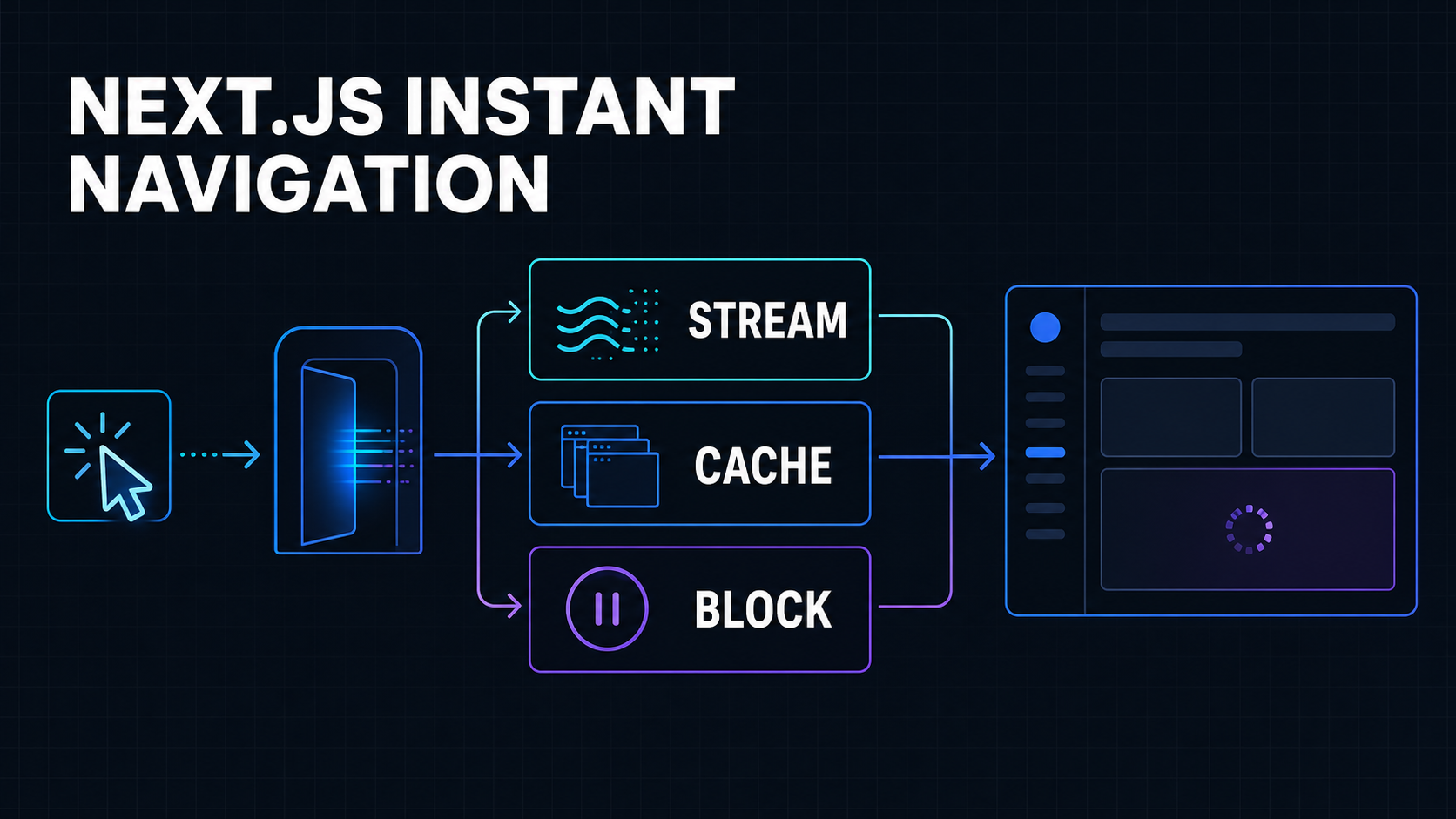
Next.js 16.3 is previewing a more explicit answer. Its Instant Navigations work asks developers to decide what a route should do when some of its content is not immediately available: stream a useful shell, reuse cached UI, or intentionally allow the navigation to block.
The official Next.js 16.3 Instant Navigations announcement describes two related changes: navigation diagnostics that identify blocking work, and partial prefetching that can reuse one route shell across many destinations.
This is promising for data-heavy SaaS products. It is also still preview software as of August 3, 2026. The right move is not a framework-wide production upgrade because the demo feels fast. It is a measured route-by-route trial that proves freshness, correctness and responsiveness together.
What “Instant” Means in a Real SaaS Product
Instant does not mean every database query finishes in zero milliseconds.
It means a click produces a meaningful visual response without waiting for all destination work to complete. The application can preserve shared navigation, render a reusable page structure and stream the request-specific content when it arrives.
Consider a route such as /customers/[customerId].
The destination may contain three kinds of UI:
- A stable shell: page layout, tabs, labels and an empty activity timeline
- Reusable data: plan names, product configuration or help content that changes infrequently
- Request-specific data: the customer record, current permissions, billing state and recent activity
Waiting for all three categories before showing anything creates a blocking navigation. Sending an honest shell immediately and streaming the customer-specific sections gives the user feedback without pretending that fresh data is already available.
That distinction matters. A spinner over the whole page is not automatically good streaming, and a cached screen is not automatically a correct screen.
The product question is: what can the user safely see and understand while fresh work continues?
The Three Decisions: Stream, Cache or Block
The preview makes a useful architectural decision visible. Each piece of work reached during navigation needs one of three treatments.
Stream fresh content behind a precise fallback
Use streaming when the content must be fresh or depends on the incoming request, but the surrounding interface can render without it.
Good candidates include:
- A tenant-specific invoice list
- Current role and permission details
- Live usage data
- Search results based on URL parameters
- A user-specific notification feed
Place a React Suspense boundary close to that content instead of wrapping the entire page in one generic loader.
import { Suspense } from "react";

export default function CustomerPage({
  params,
}: {
  params: Promise<{ customerId: string }>;
}) {
  return (
    <main>
      <CustomerHeaderSkeletonSafe />
      <Suspense fallback={<CustomerSummarySkeleton />}>
        <CustomerSummary params={params} />
      </Suspense>
      <Suspense fallback={<ActivityTimelineSkeleton />}>
        <CustomerActivity params={params} />
      </Suspense>
    </main>
  );
}
This lets independent sections resolve independently. It also keeps the fallback honest: the user sees the shape of the customer summary, not an unrelated full-screen animation.
Next.js recommends placing boundaries near runtime or uncached access because a route-level loading.tsx can sit above the shared layout boundary used by a client navigation. The current data fetching and streaming guidance explains why a same-segment loading file may not cover blocking work in a layout.
Cache UI whose staleness you can define
Use caching when the output can be shared for a known period and you have a reliable invalidation rule.
Possible candidates include:
- Subscription-plan descriptions
- Feature entitlement definitions
- Public product documentation
- Country and currency reference data
- A dashboard shell derived from slow-moving configuration
With Cache Components, use cache is not merely a database optimization. It also tells Next.js which output can participate in a prerendered or reusable shell.
import { cacheLife, cacheTag } from "next/cache";

async function PlanSummary({ planId }: { planId: string }) {
  "use cache";
  cacheLife("hours");
  cacheTag(`plan-${planId}`);

  const plan = await getPlan(planId);
  return <PlanDetails plan={plan} />;
}
The official use cache reference documents an important constraint: request APIs such as cookies(), headers() and searchParams cannot be read directly inside an ordinary cached scope. Read request-specific values outside it and pass only the inputs that are safe to make part of the cache key.
Do not cache a permissions panel simply because it removes a loader. Do not put two tenants into the same cache entry because the workspace identifier was omitted. A faster authorization mistake is still an authorization mistake.
Block only when partial UI would be misleading
Some transitions should wait.
Blocking can be appropriate when showing the destination before a prerequisite completes would create an unsafe or confusing intermediate state. Examples include switching the active tenant, completing an authentication handoff, loading a mandatory encryption context or validating access to a sensitive administrative area.
The preview supports an explicit route-level opt-out using export const instant = false. That declaration is valuable because it turns accidental waiting into an acknowledged decision.
Use it sparingly. “This route is complicated” is not a sufficient reason. Document the invariant that requires blocking, measure the delay and revisit the decision when the route changes.
Why Partial Prefetching Is Different
Traditional prefetching can do redundant work in list-heavy applications.
Imagine a support inbox with 40 links to /tickets/[id]. Every ticket detail screen may share the same toolbar, metadata grid and conversation skeleton. Prefetching a separate full destination for every visible ticket can repeat much of the same work.
Next.js 16.3 previews partial prefetching so the client can fetch a reusable shell for the route and apply it across many parameter values. The click can reveal that shell immediately while the selected ticket streams into it.
This is a particularly good fit for:
- Customer and account directories
- Ticket or conversation lists
- Orders and invoice tables
- Project boards
- Admin resources with repeated detail layouts
It is less valuable when every destination has a substantially different structure or when links are rarely used.
Prefetching is not free. It consumes network capacity, browser memory and server work. The win comes from fetching a small, reusable and truthful shell—not from downloading every possible next screen.
The broader Cache Components documentation describes how static, cached and dynamic sections can coexist: prerender what is deterministic, cache what has an explicit lifetime, and suspend work that needs request-time data.
The Failure Modes to Test Before Production
The instant-navigation model changes when content appears and what survives between routes. That creates failure modes beyond a simple build error.
Stale tenant or permission state
Switch from workspace A to workspace B, then use the browser back button. Confirm that no cached shell, label or action from A appears in B’s context.
Test role changes too. If an administrator removes a permission, an old client-side entry must not keep a privileged control usable.
Misleading skeletons
A fallback should preserve structure without presenting invented data. Avoid fake totals, placeholder customer names or controls that look enabled before permissions resolve.
Prefer neutral shapes and explicit loading labels where ambiguity could cause a user action.
Lost or preserved state in the wrong place
Shared layouts intentionally preserve React and browser state across some navigations. Verify filters, drafts, open dialogs, scroll position and unsaved form input.
Persistence can be helpful for a multi-step workflow and harmful after a tenant switch. Test both forward and back navigation rather than refreshing every destination during QA.
Incorrect metadata and route-specific styling
Preview behavior needs production-build testing, not only next dev. Navigate between routes with different titles, canonical metadata and global styles, then confirm the destination fully replaces route-specific state.
The official Next.js 16.3 preview feedback thread has already been used to surface and fix issues involving metadata, parallel routes and preserved UI behavior. That is normal for a preview, and it is exactly why a staging rollout needs broader scenarios than the happy path.
Fast appearance but slow interaction
An instant shell can paint quickly while the main thread remains busy hydrating client components or running event handlers.
Measure responsiveness after the shell appears. Google defines good Interaction to Next Paint as 200 milliseconds or less at the 75th percentile, segmented between mobile and desktop, in its INP optimization guidance. Use field data to identify the actual interaction and route; a single Lighthouse run cannot represent a logged-in SaaS session.
A Safe Evaluation Plan
Do not start with the most sensitive or complex screen. Pick one repeated detail flow where the value is visible and rollback is easy.
1. Capture the current navigation baseline
Record at least:
- Click-to-first-visible-feedback
- Click-to-useful-content
- Click-to-interactive controls
- Route error rate
- Data-fetch duration
- JavaScript long tasks
- INP for the affected route and interaction
Test on a realistic mobile device and network, not only a fast development machine.
2. Draw the destination boundary map
For each visible section, label it:
- Static shell
- Cacheable with a stated lifetime
- Fresh request-time data
- Must block for correctness
If the team cannot explain a cache lifetime or invalidation event, stream the data first. Fresh-but-slightly-later is safer than fast-but-incorrect.
3. Add the narrowest useful boundaries
Move Suspense close to independent slow work. Keep navigation, page identity and safe structure outside the boundary.
Avoid dozens of flickering islands. Boundaries should match concepts a user understands: summary, activity, usage or billing—not arbitrary component-file divisions.
4. Cache only deliberate shared output
For every use cache scope, document:
- Inputs included in the key
- Tenant boundary
- Maximum acceptable staleness
- Revalidation trigger
- Behavior when the cache is unavailable
- Whether the hosting model persists runtime entries as expected
Remember that serverless and self-hosted cache behavior can differ. Validate on the intended deployment platform.
5. Exercise navigation sequences
Test sequences, not isolated URLs:
- List → detail → next detail → back
- Workspace A → workspace B → back
- Viewer role → administrator role
- Fresh session → warm session
- Slow data source → timeout → retry
- Mutation → immediate revisit
- Deep link → client navigation → refresh
The mutation case is essential. A user who edits a record must not return to a beautiful but stale shell that hides the successful change.
6. Run preview and stable builds side by side
Keep the current production line as the control. Send internal or staging traffic through the preview and compare the same route flows.
Define rollback before starting. A preview flag should be removable without redesigning the page.
7. Wait for stable before a broad rollout
The Next.js team said in the preview discussion that it was working toward a stable release while continuing to request issue reports. Treat that as a testing invitation, not a production deadline.
Recheck release notes, migration instructions and known issues when stable arrives. Preview configuration and behavior can change.
The Practical Checklist
- [ ] Choose one high-frequency, low-risk App Router flow.
- [ ] Measure current click-to-feedback, useful content and INP.
- [ ] Separate stable shell, cacheable output and request-time data.
- [ ] Put precise
Suspensefallbacks around fresh slow sections. - [ ] Define keys, lifetimes and invalidation for every cached scope.
- [ ] Confirm tenant and permission data never cross cache boundaries.
- [ ] Test forward, back, refresh and workspace switching.
- [ ] Test mutations followed by immediate navigation.
- [ ] Verify metadata, focus, scroll, forms and route-specific styles.
- [ ] Compare production builds under realistic mobile conditions.
- [ ] Keep the stable Next.js version as a rollback path.
- [ ] Revalidate the implementation against final 16.3 documentation.
Faster Navigation Is a Product Decision
Next.js 16.3’s Instant Navigations preview is useful because it does not reduce performance to one switch.
It asks teams to make three decisions explicitly: stream data that must be fresh, cache output with a defensible lifetime, and block only where correctness requires it.
That is a stronger model for SaaS than hiding every transition behind a page-level spinner. It can make repeated list-to-detail flows feel immediate without moving all data fetching to the client or prefetching every possible destination.
But the framework cannot decide what may be stale, which skeleton is honest or when a tenant transition is complete. Those remain product and architecture decisions.
If navigation is only one part of a slower application, start with why a Next.js app feels slow after launch. For the underlying cache model, review the Next.js 16 App Router caching changes. And if client rendering remains expensive after route work is fixed, the React Compiler production guide explains what automatic memoization can and cannot solve.
Working on a SaaS that's starting to feel fragile?
Talk to an engineer about the parts that break first — without rewriting what already works. We'll recommend focused support or a compact team based on your scope.
Talk to an Engineer