
Kubernetes Node Swap: A Safe Density Playbook for SaaS
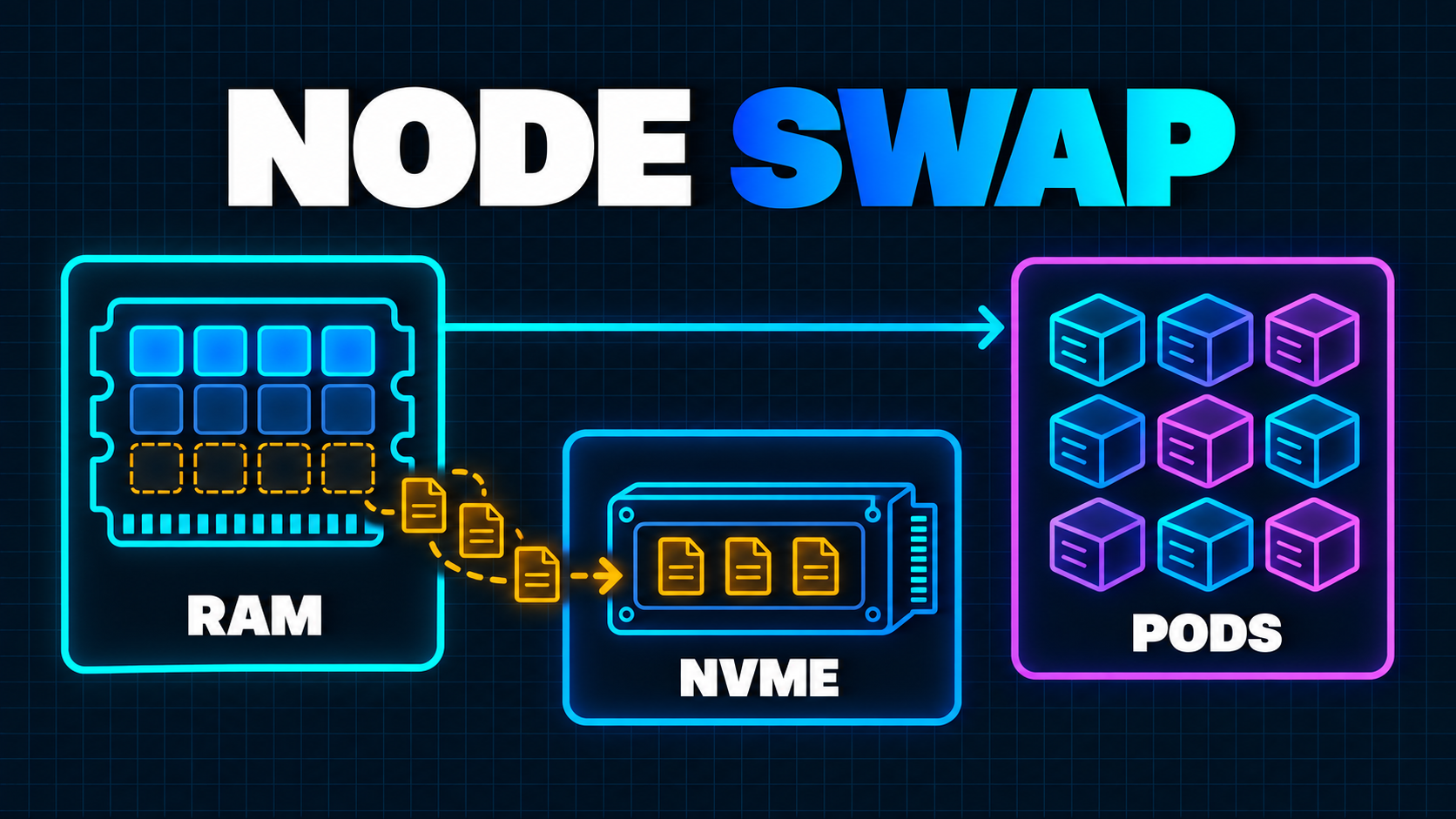
Memory-heavy workers create an awkward SaaS infrastructure problem. They need enough RAM for short peaks, but may spend much of their life waiting on a queue, a browser, a model, a user, or an external API. Size every pod for the peak and expensive memory sits idle. Size for the average and a burst can end in an out-of-memory kill.
Kubernetes node swap now offers a third option for the right workload: keep the active working set in physical memory while moving colder anonymous memory to fast local storage.
On October 5, 2026, the Kubernetes project published benchmark results for CI builds, headless-browser sandboxes, and isolated Python runtimes. Its best case reached three times the pod density with local-SSD-backed swap, but the same analysis also found a sharp slowdown when a kernel-build container was squeezed until its active working set spilled to disk. The practical lesson in the official node-swap benchmark is not “triple every cluster.” It is “identify cold memory, then prove the trade-off on your workload.”
That makes swap a production experiment, not a universal cluster setting.
What Changed in Kubernetes
Running Linux nodes with swap reached general availability in Kubernetes 1.34. The kubelet still defaults to NoSwap, so pods cannot use swap unless an operator deliberately sets failSwapOn: false and chooses LimitedSwap. Under LimitedSwap, Kubernetes calculates how much swap an eligible pod can use rather than handing it an unbounded disk-backed memory pool. The Kubernetes swap behavior reference documents that opt-in boundary.
The feature depends on the modern Linux memory-control model. With cgroup v2, memory and swap can be accounted for separately. That is materially safer than the old cgroup v1 behavior where operators had less predictable control over how much a container could push to swap.
A minimal upstream kubelet configuration looks like this:
kind: KubeletConfiguration
apiVersion: kubelet.config.k8s.io/v1beta1
failSwapOn: false
memorySwap:
  swapBehavior: LimitedSwap
This is only the switch. It does not choose the right workloads, provision fast storage, encrypt that storage, isolate the node pool, set requests and limits, or define acceptable latency. Those decisions determine whether swap becomes a useful shock absorber or a source of invisible contention.
Swap Is Not Capacity the Scheduler Understands
The most important limitation is easy to miss: Kubernetes 1.37 does not schedule pods based on swap capacity. Pods request memory; they do not request a quantity of swap. The scheduler can therefore place work correctly according to declared RAM requests while still creating an unsafe swap contention pattern on the node.
The same swap-memory management documentation warns that swap reduces predictability, can amplify noisy-neighbor effects, and depends heavily on storage IOPS. It recommends encrypted swap, fast SSD or NVMe storage, and taints so only intentional workloads land on swap-enabled nodes.
Think of the node as two unequal tiers:
- RAM is the performance tier. Active code, hot data, page cache, and latency-sensitive work should stay here.
- Swap is the tolerance tier. It can hold cold anonymous pages and absorb temporary pressure, but retrieving those pages introduces storage work and delay.
The scheduler does not model that distinction for you. Your node-pool design, placement policy, and admission rules must supply it.
Choose Workloads by Memory Shape, Not by Team
The best candidates have a burst-and-idle memory profile.
Examples include:
- browser automation sessions that initialize Chromium, perform a task, then wait;
- isolated code sandboxes with runtime overhead that becomes inactive between executions;
- CI or build workers with brief linking or compilation peaks;
- JVM workers with measurable cold pages and tolerant pause budgets;
- report generation or media jobs whose completion target is measured in minutes, not milliseconds.
The weak candidates are just as important:
- request-serving APIs with tight tail-latency objectives;
- databases, caches, and stateful services with large active working sets;
- control-plane or system-critical daemons;
- pods whose memory behavior is unknown;
- workloads where a small pause breaks a lease, heartbeat, or customer interaction.
Do not classify an entire service by its name. Two browser workers may look identical in manifests while one keeps many tabs active and the other spends most of its time idle. Measure resident memory, working set, page faults, queue time, task duration, and latency during real concurrency.
If the application is a customer-facing AI product, treat the execution runtime as a separate architectural tier. The coding-agent sandbox blueprint covers filesystem, network, credential, and merge boundaries; node swap can improve density inside that sandbox tier, but it does not replace any isolation control.
Use QoS Classes Deliberately
With LimitedSwap, only Burstable pods are eligible to use swap. Guaranteed and BestEffort pods are not. That restriction reflects intent: Guaranteed pods ask for predictable, immediately available resources, while BestEffort pods provide too little information for a safe automatic swap allocation.
A Burstable worker typically has a memory request below its memory limit:
apiVersion: apps/v1
kind: Deployment
metadata:
  name: browser-worker
spec:
  template:
    spec:
      nodeSelector:
        workload.somsite.dev/swap: "fast-nvme"
      tolerations:
        - key: "swap-workloads"
          operator: "Equal"
          value: "true"
          effect: "NoSchedule"
      containers:
        - name: worker
          image: example/browser-worker:2026-10-06
          resources:
            requests:
              cpu: "500m"
              memory: "1Gi"
            limits:
              cpu: "2"
              memory: "3Gi"
The request represents the memory you expect to protect during normal operation. The higher limit permits a controlled burst. Those values must come from profiling; they are not recommendations for a generic browser worker.
QoS also affects eviction order. Kubernetes normally considers BestEffort pods first under node pressure, then Burstable, then Guaranteed, and only pods exceeding their requests are candidates in the relevant pressure case. The official QoS documentation is a reminder that changing requests and limits affects placement, eviction, and swap eligibility at once.
Do not lower requests merely to fit more pods. If the protected RAM request no longer covers the active working set, the apparent density win is borrowed from latency and stability.
Create a Separate Swap-Enabled Node Pool
Do not begin by changing every worker node.
Create a small pool with:
- Kubernetes 1.34 or later and cgroup v2;
- fast SSD or NVMe-backed swap;
- swap encryption;
- a label that identifies the storage and policy;
- a
NoScheduletaint that only approved workloads tolerate; - enough physical RAM for the measured active working set;
- separate observability and cost attribution.
Keep APIs, databases, control-plane components, and other latency-sensitive services on non-swap nodes. This creates a simple rollback: drain the experimental pool and return the workers to their previous placement.
Storage topology matters. A swap file on the same constrained boot disk used by the container runtime and system services can turn memory pressure into node-wide I/O contention. If swap shares an ephemeral disk with pod storage, heavy paging can also compete with downloads, browser profiles, build artifacts, and logs.
Managed-provider behavior should be verified rather than inferred from upstream support. For example, GKE currently supports boot-disk, shared local-SSD, and dedicated local-SSD profiles, encrypts swap by default, and recommends isolating swap-enabled nodes with taints. Its node memory swap guide also calls swap a safety net rather than a replacement for sufficient RAM. Check the equivalent version, encryption, disk, upgrade, and monitoring contract for your provider before rollout.
Measure Pressure, Not Just Swap Bytes
Swap usage alone does not tell you whether the experiment is healthy.
A pod using 500 MiB of swap while idle may be exactly what you wanted. The same number during an active request may explain a latency regression. Connect infrastructure signals to workload states and customer outcomes.
At minimum, capture:
| Signal | What it answers | | --- | --- | | Container working set and RSS | Is active memory stable? | | Container and node swap usage | Which workloads are paging, and how much? | | Major page faults | Are pages being fetched from storage repeatedly? | | Memory PSI | Are tasks stalling because memory is constrained? | | I/O PSI and disk latency | Is swap competing for storage time? | | OOM kills and evictions | Did the buffer prevent or move failures? | | Queue wait and task duration | Did higher density improve throughput? | | API or job p95/p99 | Did customers pay for the saving? |
Pressure Stall Information is particularly useful because it measures time tasks cannot make progress due to CPU, memory, or I/O contention. Kubernetes has exposed PSI at node, pod, and container levels as a stable capability since version 1.36. The PSI documentation distinguishes some pressure, where at least one task stalls, from full pressure, where all non-idle tasks stall together.
Build the dashboard before increasing density. This follows the same principle as minimum viable observability: infrastructure telemetry is useful only when it helps explain a failed or delayed customer workflow.
Benchmark the Whole Saturation Curve
One before-and-after test is not enough. You need the curve.
Run the real workload at increasing concurrency and record:
- throughput and completion rate;
- p50, p95, and p99 task duration;
- RAM, swap, and page-fault behavior;
- CPU and storage pressure;
- OOM kills, pod evictions, and retries;
- cost per successful job or session.
Start without swap to establish the current failure point. Enable swap with the same pod count, then increase concurrency in small steps. Hold each step long enough to include idle periods, bursts, garbage collection, image pulls, log rotation, and other background work.
Look for the knee: the point where extra density causes latency or failure rates to rise disproportionately. Your production ceiling should sit below it with room for node loss and traffic variance.
Do not copy the three-times result from the Kubernetes benchmark into a capacity plan. That number belongs to one isolated Python workload, runtime, node shape, dataset, and storage configuration. Your decision should be based on cost per successful unit of work inside your own service objective.
Define Guardrails and Rollback Before Rollout
A safe rollout needs explicit abort conditions.
Examples include:
- task p95 exceeds its budget for two measurement windows;
- I/O
fullpressure becomes sustained; - major page faults continue climbing during active processing;
- the container runtime or kubelet becomes slow;
- queue throughput falls even as pod count rises;
- OOM kills move from workers to system processes;
- one tenant or workload can degrade unrelated pods;
- swap encryption or monitoring is missing on any node.
Roll out through a small percentage of workers, not a fleet-wide kubelet change. Use the same job types and traffic shapes in control and experiment pools. If the experiment fails, stop new scheduling, drain the pool, and return workloads to known-good nodes. Preserve the traces and pressure data; a failed density experiment can still reveal incorrect requests, memory leaks, or hidden I/O bottlenecks.
This is also why retries and idempotency matter. Draining a worker or losing a node must not duplicate a charge, export, notification, or customer-visible state transition. The SaaS background-jobs guide provides the recovery model that should exist before infrastructure tuning increases concurrency.
A Seven-Step Node Swap Action Plan
- Profile memory shape. Separate active working set, transient peaks, and long idle periods for each candidate workload.
- Exclude sensitive services. Keep databases, APIs, system daemons, and strict-latency workloads off the experiment.
- Build an isolated node pool. Use cgroup v2, encrypted fast storage, labels, taints, and a reversible placement policy.
- Set honest requests and limits. Make candidate pods Burstable without understating the RAM required for normal progress.
- Instrument the decision. Collect swap, working-set, page-fault, PSI, latency, throughput, eviction, and cost signals.
- Find the saturation knee. Increase concurrency gradually and choose a production ceiling below the point where contention accelerates.
- Canary and rehearse rollback. Move a small share of real work, enforce abort thresholds, drain the pool, and prove jobs recover safely.
The Production Decision
Kubernetes node swap is useful when a team has a specific density problem, a bursty workload, fast encrypted storage, and enough observability to see the cost of paging.
It is not a reason to hide memory leaks, shrink requests until scheduling looks efficient, or postpone adding RAM to a genuinely active workload. Swap changes how pressure appears; it does not repeal the physical limits of the node.
Use it as a controlled second memory tier for selected workers. Keep active work in RAM, isolate the blast radius, measure the complete saturation curve, and stop before the infrastructure saving becomes customer latency.
If memory limits, retries, node placement, and pressure signals are currently undocumented, a broader production-readiness review should establish those boundaries before the cluster is packed more tightly.
Working on a SaaS that's starting to feel fragile?
Talk to an engineer about the parts that break first — without rewriting what already works. We'll recommend focused support or a compact team based on your scope.
Talk to an Engineer