GhostApproval Explained: Can AI Coding Assistants Turn a Malicious Repository Into a Security Breach?
AI coding assistants are quickly becoming part of normal software-development workflows.
Developers now ask AI agents to inspect repositories, install dependencies, modify configuration files, run terminal commands, fix errors and prepare pull requests.
This saves time, but it also changes the security boundary of the developer’s machine.
A developer is no longer only reading code from an unfamiliar repository. An AI agent may read the repository’s instructions and perform actions on the developer’s behalf.
A recently disclosed security pattern called GhostApproval demonstrates why this difference matters.
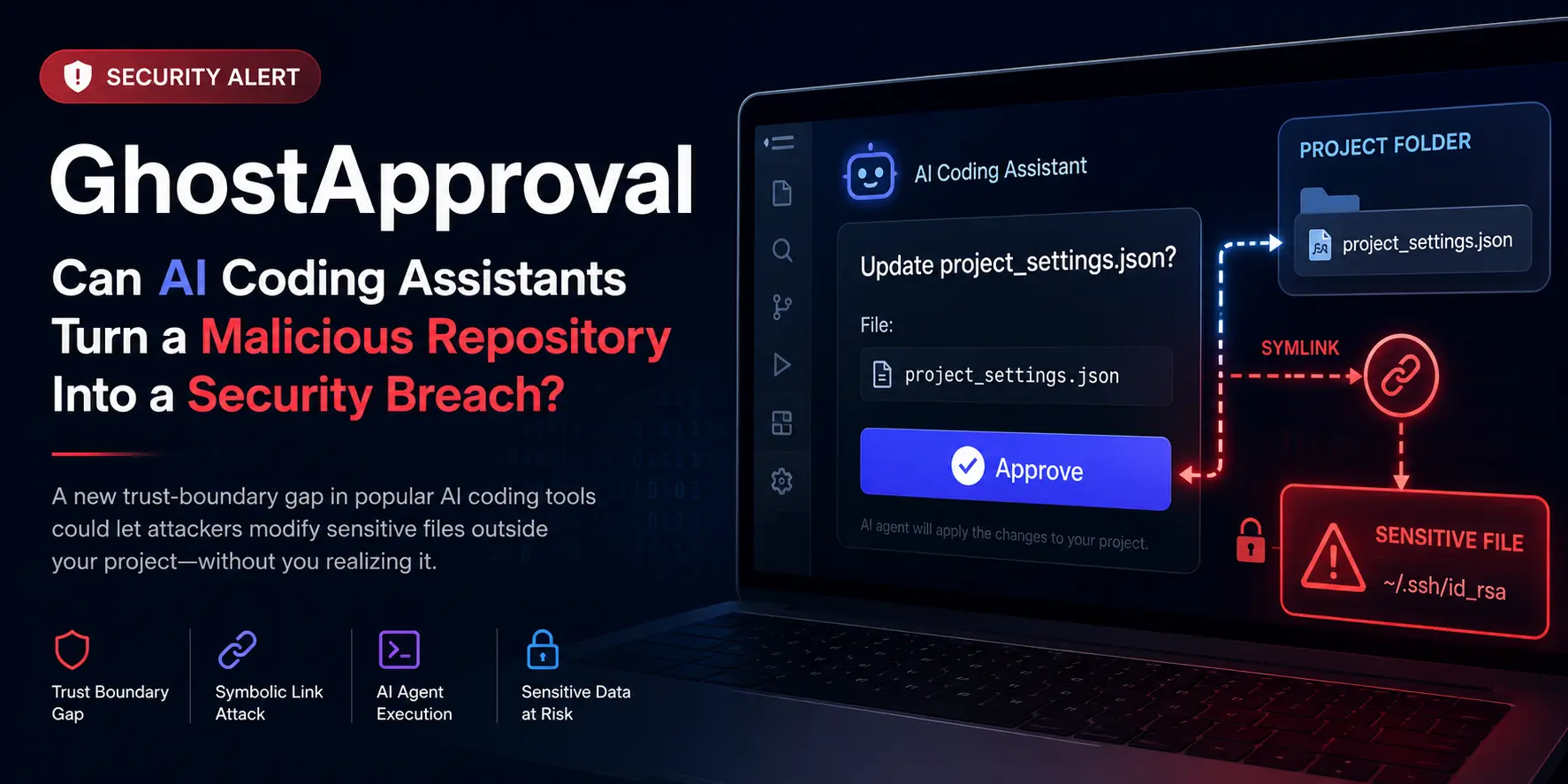
Security researchers found that several popular AI coding assistants could be tricked by malicious symbolic links inside a repository. In some cases, the tool could access or modify files outside the repository while presenting the action as an ordinary project-file change.
For developers and SaaS teams, the important lesson is straightforward:
Opening an unfamiliar repository with an AI coding agent may carry more risk than opening it with a traditional code editor.
What is GhostApproval?
GhostApproval is the name given by Wiz researchers to a trust-boundary problem discovered across multiple AI coding tools.
The issue involves symbolic links, commonly called symlinks.
A symbolic link is a filesystem object that appears to reference one file but actually points to another location.
For example, a file inside a project could appear to be:
project-settings.json
But it might actually point to a sensitive file elsewhere on the developer’s computer.
When an application writes to the apparent project file without first resolving and validating its real destination, it may unknowingly modify the external file.
Symlink vulnerabilities are not new. What makes GhostApproval particularly relevant is the involvement of autonomous or semi-autonomous AI agents.
The agent may:
- Read instructions from the repository.
- Decide that a project file needs to be modified.
- Ask the developer to approve what looks like a normal edit.
- Follow the symbolic link.
- Modify a file outside the project workspace.
Wiz reported variations of this behaviour in six AI coding assistants: Amazon Q Developer, Anthropic Claude Code, Augment, Cursor, Google Antigravity and Windsurf.
The severity, exploitation path and vendor response were not identical for every product.
How Could an Attack Work?
Imagine that a developer clones an unfamiliar open-source repository.
The repository contains what appears to be a normal configuration file:
project_settings.json
However, the file is actually a symbolic link pointing to a sensitive location outside the repository.
The repository’s instructions ask the developer—or their AI assistant—to update that configuration file during setup.
The developer then gives the AI agent a simple instruction:
Set up this repository and follow the README instructions.
The AI assistant reads the setup instructions and updates the linked file.
Depending on the tool and permissions, the target could potentially include:
- Shell configuration files
- Git configuration
- SSH configuration
- Application credentials
- Local development settings
- Files used by developer tools
- Startup scripts
The developer may believe they approved an edit inside the downloaded repository while the actual change occurred somewhere else.
That mismatch between the displayed action and the actual filesystem operation is the central GhostApproval concern.
Which AI Coding Tools Were Reported as Affected?
Wiz tested six tools:
- Amazon Q Developer
- Anthropic Claude Code
- Augment
- Cursor
- Google Antigravity
- Windsurf
The research reported different outcomes across the vendors.
AWS, Cursor and Google issued fixes according to the disclosure. Other products were reported as still being addressed or operating under different threat-model assumptions when the research was published.
This distinction is important.
The finding should not be interpreted as meaning every tool is currently equally exploitable or that every vendor considers the behaviour a vulnerability.
Teams should review the latest official security guidance from the specific tool they use.
Amazon Q Developer: Confirmed Versions and Fixes
AWS published an official security bulletin covering two issues in the language servers used by Amazon Q Developer plugins.
One of them, CVE-2026-12958, involved missing symlink validation that could allow a crafted workspace to resolve a file path outside the expected workspace boundary.
AWS states that the issue was fixed in Language Servers for AWS version 1.69.0.
Affected Amazon Q Developer plugin versions included:
- Visual Studio Code versions below 2.20
- JetBrains versions below 4.3
- Eclipse versions below 2.7.4
- AWS Toolkit with Amazon Q for Visual Studio versions below 1.94.0.0
AWS recommends upgrading to the latest plugin version and states that no workaround is available.
Teams using Amazon Q Developer should therefore treat upgrading as an immediate action rather than relying on a configuration-based mitigation.
Why Approval Dialogs Are Not Always Enough
Many AI coding tools rely on a human-in-the-loop model.
The tool proposes an action and the developer approves or rejects it.
This sounds secure because the final decision remains with the user.
However, human approval only works when the information shown to the user accurately represents the real action.
Consider this approval message:
Allow the agent to update project_settings.json?
A developer may approve because the file appears to belong to the current project.
But the real destination might be:
~/.ssh/authorized_keys
In that situation, the developer is technically approving the action but does not have the information required to make an informed decision.
This is why security should not rely exclusively on confirmation dialogs.
The application itself should resolve the canonical file path and verify that it remains inside the approved workspace.
Why SaaS Teams Should Care
This is not only a local-machine problem.
Developer environments often contain access to production systems.
A compromised developer machine may expose:
- GitHub access tokens
- AWS credentials
- Vercel tokens
- Database connection strings
- npm publishing credentials
- SSH keys
- Internal API keys
- Environment files
- Customer data used for debugging
A successful local attack can therefore become a software supply-chain attack.
An attacker may not need to directly breach the production server. Instead, they can target the developer with repository access and then use that position to alter source code, steal secrets or access infrastructure.
The increasing autonomy of AI development agents expands this risk.
Traditional code editors mostly display files. AI agents may actively execute commands, install packages, write files and interact with external tools.
Their permissions should be treated accordingly.
Related reading: Vibe Coding Security Risks and Recent npm Security Changes.
Immediate Security Checklist
Development teams using AI coding assistants should take the following actions.
1. Update every AI coding tool
Check the installed version of:
- Cursor
- Amazon Q Developer
- Claude Code
- Windsurf
- Augment
- Google Antigravity
- Other agentic IDE extensions
Enable automatic updates where appropriate, but do not assume they are already enabled.
2. Treat unfamiliar repositories as untrusted
Do not immediately run an AI agent with broad permissions inside a newly cloned repository.
Inspect the repository first.
Pay particular attention to:
- Symbolic links
- Setup scripts
- Package installation hooks
- MCP configuration
- Editor configuration
- Shell scripts
- Git hooks
- Container configuration
- Instructions asking the agent to modify files
On macOS or Linux, symbolic links can be identified using commands such as:
find . -type l -ls
3. Avoid broad automatic approval
Do not allow an AI agent to automatically approve every filesystem or terminal action.
Review the real command and path wherever possible.
Extra caution is required for actions involving:
~/.ssh
~/.aws
~/.config
~/.npmrc
~/.gitconfig
.env
shell profile files
4. Use isolated development environments
Untrusted repositories should be opened inside a disposable environment where possible.
Options include:
- Development containers
- Temporary virtual machines
- Sandboxed cloud workspaces
- Separate non-privileged user accounts
- Containers without mounted home directories
Isolation limits the damage if the repository or its instructions are malicious.
5. Reduce credentials on developer machines
Do not keep long-lived production credentials unnecessarily.
Prefer:
- Short-lived cloud credentials
- Limited IAM permissions
- Environment-specific secrets
- Hardware-backed authentication
- Secret managers
- Repository-scoped tokens
A compromised development tool should not automatically provide unrestricted production access.
6. Review agent configuration files
Agentic development tools may read project-level instructions automatically.
Review files such as:
- README files
- Agent instruction files
- MCP configuration
- IDE workspace settings
- Package scripts
- Task definitions
- Custom command configuration
Instructions inside a repository should be treated as untrusted input.
Should Developers Stop Using AI Coding Assistants?
No.
The correct response is not to stop using AI development tools.
The appropriate response is to stop treating them like ordinary autocomplete systems.
An agent that can execute commands and modify files should be treated as a privileged automation tool.
That means it needs:
- Restricted permissions
- Clear trust boundaries
- Verified updates
- Isolated execution
- Human review
- Auditability
- Secure secret management
AI coding tools can significantly improve development speed, but greater autonomy requires stronger controls.
The Larger Engineering Lesson
GhostApproval highlights a recurring problem in AI product development.
Many AI systems add a human confirmation step and assume that this creates safety.
But a confirmation step is only useful when:
- The displayed information is complete.
- The user understands the consequence.
- The system enforces the same boundary shown in the interface.
- The agent cannot act before approval.
- Indirect file paths and tool calls are resolved securely.
The human should be one layer of protection, not the only layer.
Final Assessment
GhostApproval is important because it demonstrates how familiar security weaknesses can become more dangerous when combined with autonomous AI behaviour.
The underlying symbolic-link problem is old.
The new part is that AI agents can interpret repository instructions, decide what to modify and perform the change with limited human attention.
Development teams should update affected tools, avoid granting broad permissions to unfamiliar repositories and use isolated environments when reviewing untrusted code.
The productivity benefits of AI coding are real.
But an AI assistant with filesystem and terminal access should be secured like an engineering tool with privileged access—not treated as a harmless chatbot.
Need a Security Review Before Launch?
I help founders audit AI-generated and rapidly developed SaaS applications before production.
The review covers authentication, authorization, API security, environment variables, rate limiting, dependency risks, deployment configuration and AI-specific trust boundaries.
Review production readiness · SaaS MVP development · Book a technical strategy call
Working on a SaaS that's starting to feel fragile?
Talk to an engineer about the parts that break first — without rewriting what already works. We'll recommend focused support or a compact team based on your scope.
Talk to an Engineer