Building Your First MCP Server: A SaaS Founder's Shortest Path to an AI Product
If you're a SaaS founder thinking about "adding AI" but every path you look at feels either too expensive, too vague, or too crowded — this post is for you.
Most founders think the only way to build an AI product is to train a model, wrap a chatbot around GPT, or raise money for an "AI-first" pivot. None of those are the shortest path for most people.
The shortest path, for a surprising number of founders right now, is building an MCP server.
This post explains what that actually means in plain language, why it's one of the fastest ways to ship something real, and how to decide if it fits your SaaS or your next product idea.
MCP is a standard that lets AI tools connect to your data and actions without you building a full chat interface or training a model.
For most SaaS founders, an MCP server is a 1-to-2 week project that produces a genuinely new product surface — not a demo.
What an MCP Server Actually Is
MCP stands for Model Context Protocol. The short version:
It's a standard way for AI tools — Claude, Cursor, ChatGPT desktop, and others — to plug into your system to pull data, run actions, or both.
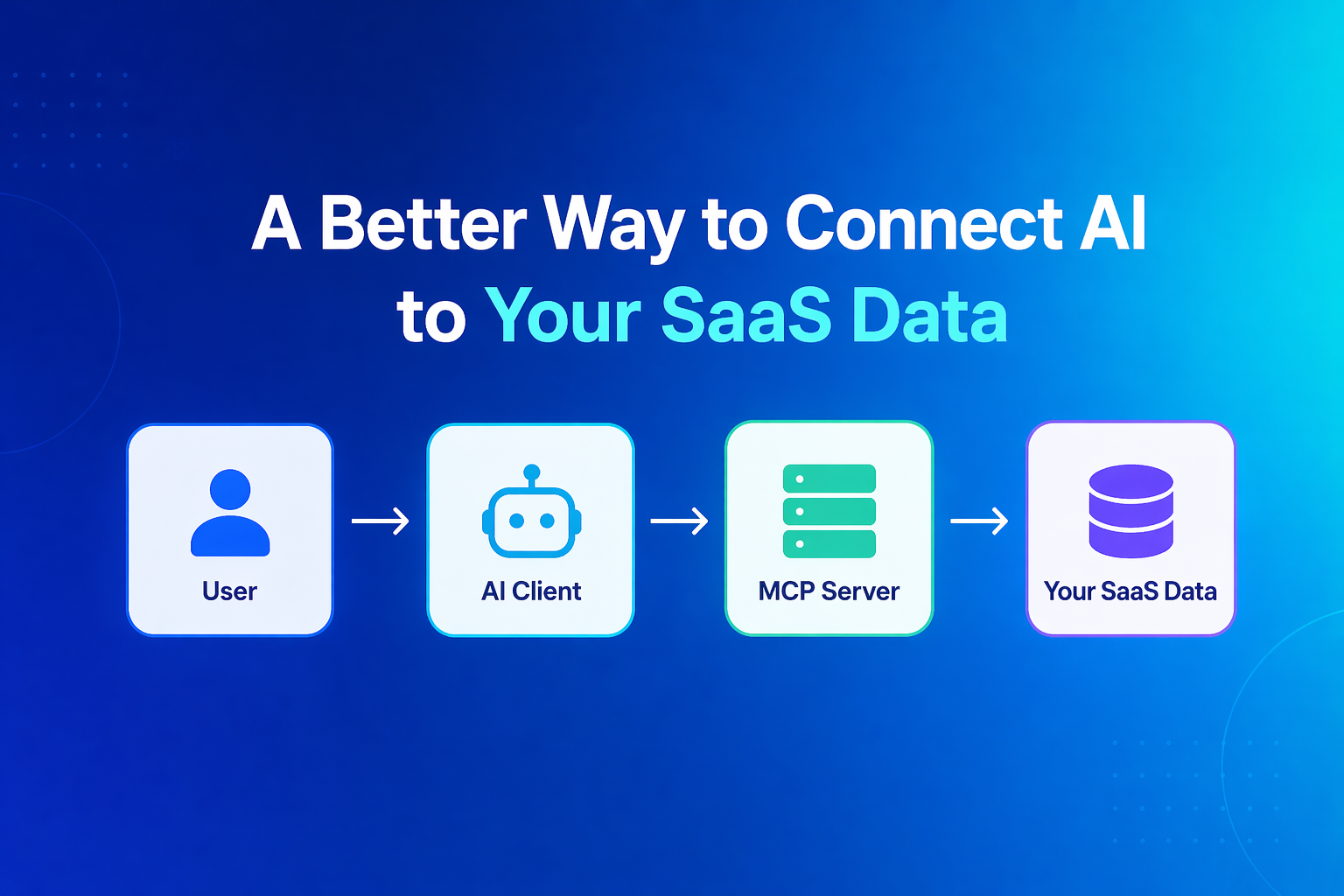
Instead of a user logging into your SaaS product to do a task, they can ask their AI assistant to do it for them. Your MCP server is the bridge.
A concrete example: imagine you run a project management SaaS. A user normally opens your app, filters their tasks, and checks deadlines. With an MCP server, they can ask Claude "what am I overdue on across all my projects?" and Claude pulls that directly from your system and answers.
You didn't build a chatbot. You didn't train a model. You exposed your existing data and actions through a standard interface, and every major AI client speaks that interface out of the box.
Why This Matters for Founders Right Now
Three reasons MCP is underrated as a founder move in 2026.
1. The Surface Area Is New, So Competition Is Thin
Every major AI product category is crowded. Chat apps, copilots, writing tools, code assistants — there are hundreds of them, and most are burning through their venture capital trying to out-market each other.
MCP servers are different. The ecosystem is early. Directories are not saturated. The first MCP server for a specific niche often has no real competition at all. Six months from now, this will not be true.
2. You Ship in Weeks, Not Quarters
A real MCP server that connects to your existing database and exposes useful actions is typically a one-to-two week build. You are not training a model. You are not designing a new UI. You are writing a few endpoints that describe what your system can do, in a format AI clients understand.
For a founder, this means you can validate an AI product without a six-month roadmap.
3. It Extends Your SaaS Without Rebuilding It
If you already have a SaaS product, an MCP server is not a replacement. It's an additional surface. Your web app keeps working. Your existing users keep using it. Some subset of them starts using your product through Claude or Cursor, and that subset tends to be sticky.
You're not forking your roadmap. You're adding a distribution channel that your competitors haven't thought about yet.
The Three Categories of MCP Server Worth Building
Not every MCP server is a product. Most are just wrappers. Here's how I'd think about which ones have real legs.
Category 1: Workflow Shortcuts for Existing SaaS Users
You already have customers. Some of them spend hours a week inside your product doing the same handful of tasks. An MCP server that lets them trigger those tasks from inside their AI assistant turns "I have to open the app" into "I just ask."
Examples:
- A CRM exposing "log this call as a meeting note" and "pull up my pipeline for this week"
- An analytics product exposing "what changed in our signups yesterday"
- A support tool exposing "draft a reply to ticket #4213 using our voice"
This is the safest category because you already have users who will try it.
Category 2: Domain-Specific Data Access for Devs and Ops
Developers and ops teams increasingly live in Cursor, Claude Code, and similar tools. An MCP server that gives those tools direct access to a specific data source becomes a small but real product.
Examples:
- A Stripe-adjacent server for deep billing queries your dashboard doesn't surface
- A server that exposes internal documentation, ADRs, and architecture notes
- A server that queries production logs in a structured way
These are useful on day one and don't need a big user base to justify themselves.
Category 3: Niche B2B Integrations
This is the least obvious category and often the most defensible. Pick a specific industry, find the data sources and tools in it, and build an MCP server that stitches them together.
Examples:
- A legal research server that connects to specific case databases
- A real estate server that pulls from MLS feeds and exposes structured queries
- A supply chain server that hits specific ERP APIs with meaningful aggregations
The technical work is modest. The moat is knowing the industry well enough to expose the right abstractions.
The pattern that consistently wins is small scope, specific audience, obvious usefulness. Generic MCP servers that try to do everything for everyone mostly get ignored.
What Goes Into a Real MCP Server
A useful MCP server has three building blocks.
1. Tools
These are the actions the AI can take on behalf of the user. Create a task, send a message, run a query, fetch a record.
Each tool is a function with a name, a description, and a typed set of parameters. Good tool design is about choosing the right level of granularity — not so fine-grained that the AI has to chain ten calls, not so coarse that it can only do one thing.
2. Resources
These are the readable things the AI can pull into its context. Customer profiles, document contents, project lists, recent activity.
Good resource design matches how users actually reference things. If your users think in terms of "this week's invoices," expose that, not "all invoices sorted by date descending limit 50."
3. Prompts (Optional but Useful)
These are pre-built instructions the user can invoke to get a specific outcome. "Summarize my week," "draft a reply in the product's voice," "generate a status update from recent activity."
Prompts are what turn an MCP server from a data connector into something that feels like a product.
The Hard Part Isn't Technical
Here's the part most MCP tutorials don't cover.
Writing an MCP server is not hard. The official SDKs are straightforward. You can get a working server that does something real in a few days.
The hard part is product design:
- What should a user be able to ask? Not "what data do I have" — "what questions do my users actually ask?"
- How does this get discovered? A great MCP server that nobody installs is not a product. Distribution is still distribution.
- How do you charge for it? Free forever. Paid directly. Tied to an existing subscription. Each has tradeoffs.
- How does auth work cleanly? Users will not tolerate a confusing auth flow. Getting this right is often the difference between adoption and abandonment.
Spend real time on these questions before writing code. An MCP server shipped fast with the wrong product answers is worse than one shipped a week later with the right ones.
The single most common MCP server mistake is exposing your entire API surface as tools. Users and AI models both do better when you expose a small number of opinionated, high-level actions instead of a long list of CRUD endpoints.
A Realistic Build Plan
If I were helping a founder ship their first MCP server, the plan would look like this.
Week 1: Scope and Design
- Pick one audience (existing users, a specific role, a specific industry)
- Identify the top five things they want to do or know
- Sketch those as tools and resources on paper
- Decide on auth, pricing, and distribution before writing code
Week 2: Build the Core
- Implement the tools and resources with simple, typed interfaces
- Connect to your existing data sources — don't build new ones for this
- Add a small number of well-designed prompts
- Test it against Claude, Cursor, and one other client
Week 3: Distribution and Polish
- Publish to the relevant MCP directories
- Write a launch post with real examples, not a feature list
- Share with 10 to 20 users you know personally
- Listen carefully — early feedback on MCP servers is disproportionately useful because the product surface is new
Week 4 and Beyond: Iterate on What Gets Used
Most of your tools will not be used. That's normal. The ones that are will tell you what to build more of. Resist the urge to add features; instead, make the used features sharper.
When an MCP Server Is a Bad Idea
To be fair:
- If you don't have an existing audience and no real domain advantage, building an MCP server is just as hard as building any other product.
- If your core product is mostly visual, the MCP surface will feel thin. A design tool or video editor is not a natural MCP fit.
- If your data is deeply sensitive or regulated, the auth, consent, and audit surface around MCP is not yet mature enough to casually ship for healthcare, finance, or similar.
- If you're trying to build a chatbot, MCP is not the answer. Build a chatbot.
The Honest Take
MCP servers are having a moment because the cost-to-value ratio for building one is unusually good right now. The standard is stable enough to build on, the clients are real, the ecosystem is still early enough that good work gets noticed.
That window will not last. Every new surface area eventually gets crowded. The founders who build useful MCP servers in 2026 will be the ones who still look relevant in 2027 because they got in early and shipped something real.
It is not a lottery ticket. It is a specific, short, well-scoped way to ship an AI product that isn't a chatbot and isn't a wrapper. For the right founder, that's a rare combination.
An MCP server is not a moonshot. It is a small, focused product that either solves a real problem for a specific audience or doesn't. That's a much easier bet to evaluate than most AI product ideas.
Final Thoughts
If you're a founder who's been watching the AI wave from the sidelines — not sure what to build, not sure where to start, not sure what's hype and what's real — an MCP server is one of the few concrete answers available right now.
It is small enough to ship. It is new enough to stand out. It is practical enough to evaluate. And it doesn't require you to compete with Anthropic, OpenAI, or anyone else at the model layer.
If you're also thinking about AI features inside your existing SaaS, Which AI Features Are Actually Worth Building in a SaaS Product Right Now? is a useful companion read on what's worth shipping and what isn't.
If you want to build an AI-powered SaaS product or add AI features to an existing one, see AI SaaS Development.
If you have an idea and want someone to help you decide if an MCP server is the right first move, book a 20-minute strategy call.
Working on a SaaS that's starting to feel fragile?
Talk to an engineer about the parts that break first — without rewriting what already works. We'll recommend focused support or a compact team based on your scope.
Talk to an Engineer